Posts

Showing posts from 2018

MeshCentral2 - Video Chat & Terminal

Image
MeshCentral is an open source web based remote computer management web site. As the software matures, people as increasingly been asking for features that enable remote support usages. For example, having the agent run only temporarily or being able to chat with a user on a remote computer. In the last few months, MeshCentral has gained some of these features including remote text chat. This week, we are doubling down and adding audio, video and file transfer support to the MeshCentral messenger application. Modern browsers have WebRTC for video conferencing and MeshCentral2 is now taking full advantage of this. First, when you establish a chat session, the browser will try to switch to using WebRTC to setup a direct path between the two browsers. If this is successful, all chat messages and file transfers are will go directly between the browsers, skipping the server. This reduces the server traffic, improves server scaling and lowers hosting costs. In addition, once the WebRTC dir...
MeshCentral2 - Running as an Appliance

Image
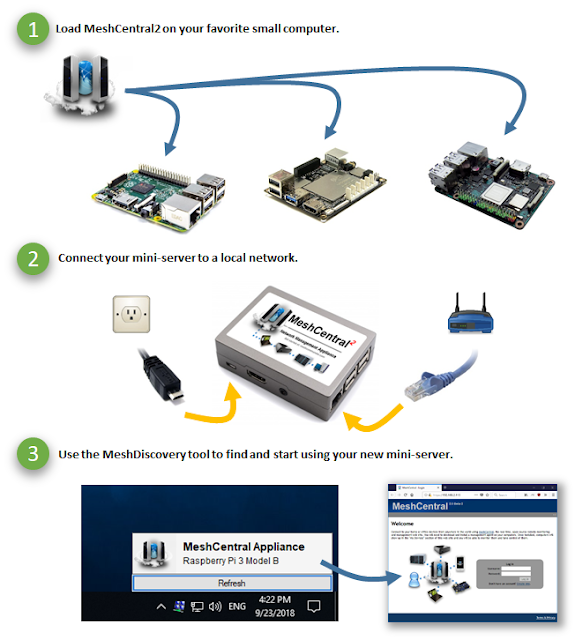
MeshCentral is an open source web based remote computer management web site. One of the interesting advantages of MeshCentral version 2 is that the server is written entirely in NodeJS and so, can run on many operating systems, including Linux. In addition, it can run very efficiently on tiny appliance devices with limited, CPU and RAM. For example, you can load it on a ASUS Tinker Board , a Latte Panda , a Raspberry Pi or any of such devices. Once installed, it can easily manage 100’s of devices on a local network including remote management thru Intel® AMT when available. You can often install very light operating systems on these appliances that don’t run X Windows, freeing a lot of storage space and RAM. The appliance form factor is perfect for an always on server that you can keep attached to a network router. Some of these boards can run using Power-over-Ethernet (PoE) so, only one cable needs to be plugged in. Once you have a device, get started using our MeshCentral Instal...

MeshCentral2 - Apple OSX, Ubuntu 18.04, Reverse-Proxy, MeshMessenger

Image
MeshCentral can manage a wide range of Windows and Linux computers. This week, we added initial support for Apple MacOS. Once you update to the latest MeshCentral, you will have the option to download and install the MeshAgent for Apple MacOS. In addition, we improved support for reverse proxies, added the first version of MeshMessenger, added Ubuntu 18.04 support and introduced a new built-in chat application. In details: Apple MacOS support. Supporting a new operating system is a lot of work. It’s especially difficult when the MeshAgent is trying to act as a remote desktop server and do this while users are logging in and out. Screen grabbing the user’s display and performing remote input is a lot of work. The code to do this changes a lot between operating systems. Doing all this on the latest MacOS is amazing. Due to security restrictions, we were not able to perform remote input on the MacOS login screen, but everything else should work correctly. This is an early version, ma...

MeshCommander 0.7.3 with CILA support

Image
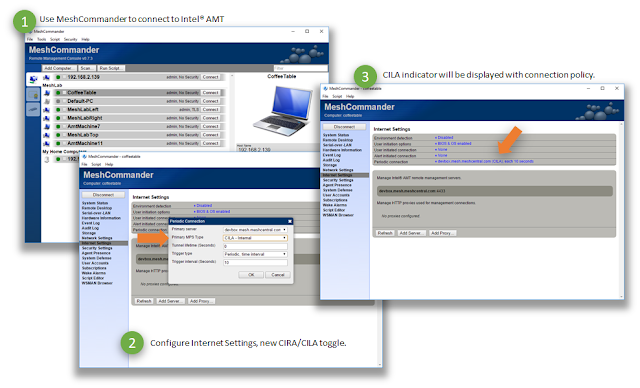
MeshCommander is an open source web-based Intel® AMT management console. It’s a leading edge tool and today, MeshCommander added support for Client Initiated Local Access (CILA) . It's important to be able to remotely manage computers both in software and hardware regardless of where they are connected. Client Initiated Remote Access (CIRA) has been around since Intel® AMT 4.x and provides the way hardware management can connect back to a cloud server. Starting with Intel® AMT 11.6, CIRA is joined by CILA, the local version of the same tunneling system. With CILA, you can now configure Intel® AMT to connect back to a home management server both over the Internet and over the local network . Using a tunneling protocol on the local network means that Intel® AMT is always accurately discovered by the management server. This makes it easy for a server like MeshCentral2 to keep track of all of the Intel® AMT capable devices on a local network. In addition, local management ports (...

MeshCentral now with reverse-proxy support

Image
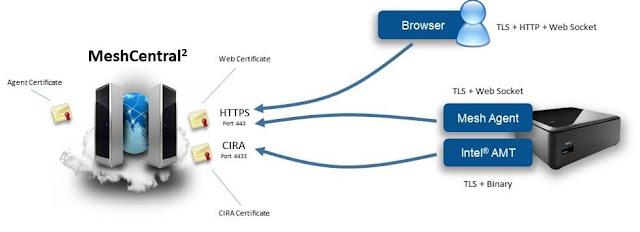
MeshCentral is an open source web based remote management server. This last week, MeshCentral was improved again with support for reverse-proxies that allow for improved scalability and flexibility when deploying MeshCentral as a web service. Any serious network administrator will know about reverse-proxies, notably NGINX but many others exists. There are many benefits including more flexibility in how a web server is configured, allows many web applications can run together on the same server, TLS offloading and load balancing. As more people deploy MeshCentral2, it’s became a more frequent request to add proper support for reverse proxies, notably NGINX. This week, a new version of MeshCentral was released on NPM along with a new MeshCentral User’s Guide 0.1.8 and a YouTube video with a tutorial on how to support NGINX . MeshCentral has an interesting design where the Mesh Agents connect to the server using web sockets on the same port that users connect on with browsers. This...

MeshCommander can connect to MeshCentral2

Image
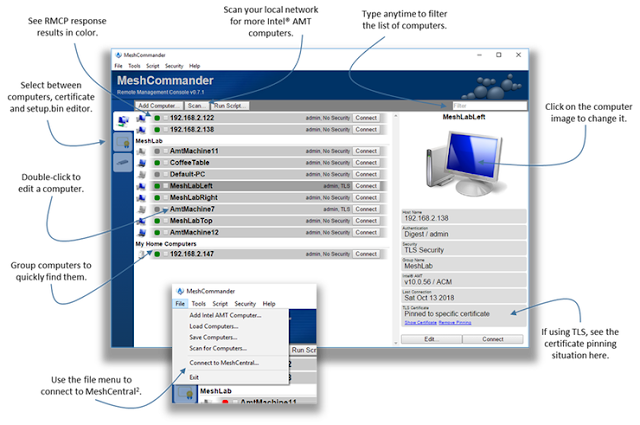
This week is a big one for the standalone version of MeshCommander as version 0.7.1 was released with an improved user interface and more significantly, the ability to connect to a MeshCentral2 account and manage computers over the Internet. Up until now, the standalone MeshCommander has been a break-fix Intel® AMT management console limited to your local network, but this limitation is removed with this new release as MeshCentral2 can act as a Management Presence Server (MPS) for MeshCommander. This new feature allows MeshCommander to perform WSMAN and KVM, SOL, IDER sessions over Intel® AMT remote connections (CIRA) greatly enhancing the capability of an already feature rich tool. There is a new YouTube demonstration video that shows off all the latest improvements. In detail: MeshCommander now has an improved user interface, especially the computer selection screen . The basic idea was to make MeshCommander look a lot like the new user interface of MeshCentral2 which...

MeshCentral Improved Windows Installer

Image
One of the amazing features of MeshCentral2 is that it can be installed quickly on pretty much any computer that is Windows or Linux. For Windows users, it’s super easy since the installer that does all the work. You can get a fully working server up and running in a few minutes. Any version of Windows 7 or better will work. This week, the MeshCentral2 installer for Windows was improved significantly . It’s not just an installer anymore, you can scan your local network to find MeshCentral2 servers, edit advanced settings, update the server and more. The new version 1.2 of the installer is available for download here . In details: The installer will only work when connected on the Internet as it will download and install the latest version of MeshCentral2. The new network scanner will find MeshCentral2 servers that are in “LAN mode” or “Hybrid mode” on the local network, this is going to be important for upcoming MeshCentral2 appliance support. The new advanced configuration scre...

MeshCentral improved user interface

Image
In the last two months MeshCentral got a lot better. Many new features, bug fixes and ease of use improvements so that a server can be installed and fully usable in a few minutes in many situations, and this on Windows and Linux. For many system administrators, all you need to know is “ npm install meshcentral ” to get started. Certainly the most noticeable change in the last few weeks is the new user interface marking a significant departure from the older MeshCentralv1. MeshCentralv2 run a fully real-time user interface so that you never have to hit a “refresh” button. The interface always displays the latest state of all devices and makes much better use of the complete surface area of the browser, making it great for both large screens and users who want to have a small browser window on the desktop. Check out the pictures below. Here are some more details on the latest update: New user interface will auto-scale to fill the browser window and has a new left side navigation ba...

Installer’s Guide, Windows7 and more.

Image
In the last few weeks we got the code a lot more stable and started working on testing installation of MeshCentral in many more environments. The current version is MeshCentral is v0.1.9-f . One of the interesting design decision was to build the entire server in NodeJS, this allows MeshCentral to quickly be installed and run on many different platforms including Windows and Linux. Last week, in addition to the existing MeshCentral User’s Guide , we published an all new MeshCentral Installer’s Guide that allows administrators to install MeshCentral on many different operating systems, on your own computers or major cloud providers . In other news, we added support for the MeshAgent on Windows7 which is probably one of the leading requests. Here is a look at everything in detail: Published MeshCentral Installer’s Guide . In this new guide , we walk thru how to install MeshCentral on Ubuntu Linux, the Raspberry Pi and on Amazon AWS, Microsoft Azure and Google Cloud. Many Linux admin...

MeshCentral New Mobile Web Application

Image
It’s been a while since the last announcement but I have been hard at work on MeshCentral , the web-based open source remote management software. This week we got a big new feature with release of MeshCentral v0.1.8-c on NPM , we now have a new web application for mobile devices . When you install your own MeshCentral server and access it using a mobile device (like a phone or tablet), you will see a new web page tailored for small devices. This is the first version of it, but already it offers many of the main usages that are offered on the main web site in a more compact form. Some of the features offered in the mobile application: New card stack UI . Unlike the main web site, the mobile site uses a card stack UI model, where you can select screens and hit “back” at any time to return. This is quite a different model from the tabs on the main site, but allows the UI to be significantly more compact. Real time user interface . Like the main web site, the mobile site is fully real t...

Remote Toast, Agent Presence, Device Groups

Image
As people following the Mesh work would know, there are currently three open source tools for remote management of computers being worked on: MeshCentral , MeshCommander and MeshCmd . MeshCentral is a remote management web site, MeshCommander is a web based Intel® AMT management console and MeshCmd is a Linux & Windows command line tool that performs many Intel® AMT tasks. This week, I released new versions of all three tools. Let’s take a look at the improvements made to each of them: MeshCentral2 . We keep fixing bugs in the web site and improving performance, most changes will not be noticed by users except for the new toast button that is now available on the “Desktop” tab when remoting a Windows computer. The toast button allows the administrator to send a short text message that will be displayed on the remote computer. It’s a nice and quick way to make a message show up on remote computers. MeshCommander . In addition to many bug fixed and improved input validation on dia...

Notes, Account Management & Locking

Image
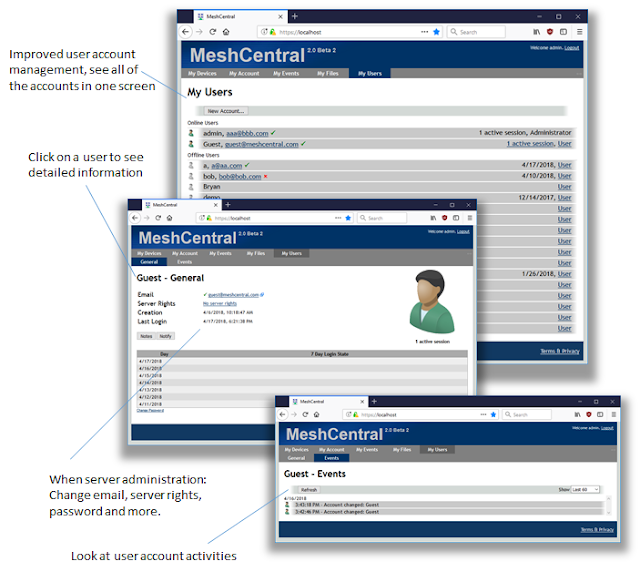
This week is the last feature release for a little while because of traveling and vacations coming up and a bit more focus on bug fixes. This said, we have a bunch of really good features released this week that improve MeshCentral2. The focus was on making administration of a MeshCentral2 server and users a lot better. New this week: Improved user management . For server administrators, the “My Users” tab is much better. Administrators will immediately see the difference. Users are now listed with online users on the top, improved indications of validated emails and for each user, there is now a full sub-section with user information and configuration and events for each user. You can how edit the email address, validation status, server rights and update the password in a single screen. The user management look and feel as also been improved. The user login timeline is not yet implemented, a placeholder is currently displayed. Account locking . Administrators can now lock out use...

Frame rate, Temporary agent, Processes

Image
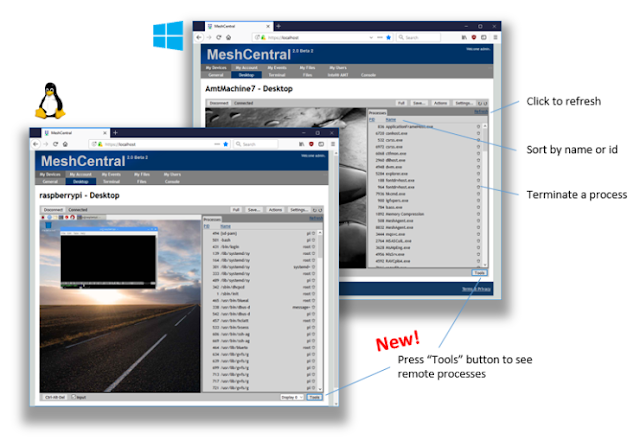
The pace of releases is accelerating as the core components of MeshCentral2 are maturing and it’s getting easier to build new features. The “all JavaScript” nature of MeshCentral2 with the browser, server, database and agent all being JavaScript makes things easy for developers. This week, we have 3 major new features to announce : New process control panel . When in the “Desktop” tab, you can now hit the “Tools” button to toggle the new tools view. In that panel, you will see the list of processes the remote computer is running both on Linux and Windows. In addition, you can sort the processes by ID or names and terminate a process remotely using the small garbage icon. One more way MeshCentral2 makes remote management of computers easy. Temporary Agent support . The MeshCentral server supports having the agent running in temporary mode. You can now download the agent executable and run it directly from the dialog box. The agent will keep running as long as the dialog box is open. ...

MeshCmd + User Notifications

Image
This week, Bryan Roe significantly improved the MeshCmd tool that is included in MeshCentral2 and available as a standalone download. Bryan added the capability to run MicroLMS and MeshCommander in the background and this on both Linux and Windows. Starting today, you can download MeshCmd and run: meshcmd microlms install/start/stop/uninstall meshcmd meshcommander install/start/stop/uninstall This will install and start in the background MicroLMS with LMS MeshCommander for local management, or MeshCommander for remote management. On Windows, it’s installed as a standard Windows Service. On Linux, the installation will work correctly on both newer systemd and older initd Linux computers, with the installation adapting correctly to each. In addition, MeshCentral2 got many bug fixes, security hardening and a few new features this week. Notably, you can now switch between the multi-desktop view and taking control of a computer’s desktop without the connection having to be re-establ...

Multi-computer desktop viewer

Image
This week is spring break in Oregon and we are going to celebrate with a smaller and more fun MeshCentral2 update. We just released support for viewing multiple computers desktop at the same time . This is very useful for digital signage usages where you want to monitor the screens of many computers in real time. In MeshCentral2 v0.1.5-p , you can now select “Desktops” in the view drop-down on the top right of the devices view. You will see all your currently connected computers and you can click on the screens to toggle connection to that device. On the multi-desktop screen, you click “Connect all” or “Disconnect all” to connect/disconnect all screens at once. Check “AutoConnect” to connect to all desktops and automatically connect to any new computer that comes online. Like all of the other screens on MeshCentral2, the multi-desktop screen is fully real time, with computer names, icons and status being updated on the web page without user interaction. If you are looking at managi...

MeshCmd, The new Intel AMT command line tool

Image
Just posted on the MeshCommander.com web site a new do-it-all command line tool for Intel® AMT that runs on both Windows and Linux . The new tool is called “MeshCmd” also called “MeshCommand”. It makes it easy to do all sorts of things with Intel AMT including: get Intel AMT state, perform basic activation, LMS services, configuration and remote management of other Intel AMT computers on the network and much more. If you are in the Intel AMT space, take a look at the new MeshCmd tutorial video on YouTube , it’s really worth a watch. MeshCmd is a single executable file available for download on MeshCommander.com along with a full user’s guide (pdf). Here is a quick list of what MeshCmd can do in the context of Intel AMT: Get the local state of Intel AMT, including version, activation state and more. Show the Intel AMT audit log of your local computer (even without any credentials) or of a remote computer. Startup LMS services along with local hosting of MeshCommander for L...

MeshCentral2 - Windows Installer, Server Aliasing & Wide Mode Support

Image
MeshCentral is an open source web based remote computer management web site. We release new versions many times a week and this week we added a bunch of more interesting features & improvements: New MeshCentral installer for Windows . MeshCentral2 is pretty amazing in that you can install and run a new server easily and within minutes on both Windows and Linux. However, for Windows users we just made the process of getting your own MeshCentral2 server up and running even simpler with the all new MeshCentral2 installer for Windows . This installer will automatically detect, download and install NodeJS if needed along with installing the very latest version of MeshCentral. It can also be used for limited configuration of the server to get you started and to perform server updates. The new installer is fast, interactive and super simple. Anyone can launch a remote management service in minutes. Wide screen toggle . You can now toggle the web page to use the full widt...

MeshCentral2 - Now with WebRTC support

Image
MeshCentral offers web based remote desktop, terminal and file transfer allowing administrators to access and remotely manage computers on the local network or over the Internet. So far, we had to relay the traffic from the user’s browser thru the server to the mesh agent on the remote computer creating a lot of traffic on the server which slows down the connections and adds to server workload and hosting costs. To go a long way to solving the traffic relay thru the server problem, last week the latest version of MeshCentral2 was published with WebRTC support turned on by default . This feature is in large part due to many longs days and late night coding sessions by Bryan Roe who worked on fixing and updating BCP’s WebRTC data stack for this usage. With this new version, the Browser and Mesh Agent will attempt to communicate directly to each other using WebRTC bypassing the server entirely. If successful, the remote desktop and terminal session are faster, lower-latency a...

MeshCentral2 - Now with Let's Encrypt support

Image
Because MeshCentral is web based and deals with lots of administrative information, it’s important that all traffic be authenticated and encrypted using HTTPS. However, for people setting up their own MeshCentral2 server, obtaining a trusted TLS/HTTPS certificate can be a problem and cost money. Well, this week, the problem is solved by building-in Let’s Encrypt support right into MeshCentral2 . With this latest version ( Currently v0.1.2-s ), you can configure MeshCentral to automatically obtain, use and renew its HTTPS certificate. To use this new feature, you need to have your own MeshCentral2 server setup with a domain name pointing to it. You also need the MeshCentral HTTP server to be accessible over the Internet on port 80 - mapping it to a different port will not work. You can find out how to configure automatic TLS certificates in the latest version of the MeshCentral User’s Guide , we added a new section on Let’s Encrypt. Once setup correctly, MeshCentral will ...

MeshCommander for NPM - Linux, OSX, Windows

Image
MeshCommander is a web-based Intel® AMT management console that you can download, install and use to connect to and manage your Intel® AMT computers. MeshCommander is over two years old, turning out to be a popular tool. A few days back I published MeshCommander on NPM for easy installation on Linux, OSX and Windows . Most people familiar with NodeJS will know exactly what this means. Enter a new folder and type:     npm install meshcommander     node ./node_module/meshcommander This will start a small MeshCommander web server on any operating system with NodeJS and NPM installed. Then point your browser to http://localhost:3000 which is the default location and you are good to go. Never has it been easier and run MeshCommander on Linux or OSX. I think this is perfect for people using Intel® AMT for IoT and wanting to have a high quality Intel® AMT console. If you want to update to the latest version of MeshCommander, just run the first li...

MeshCentral2 - Email Server / DNS Multi-Tenancy / User's Guide

Image
It’s a new year and MeshCentral2 is moving forward with plenty of new features with the goal of having the first non-Beta version in the first half of this year. MeshCentral is an open source web based remote computer management web site. In the last month, many significant new features where added and an all new User’s Guide packed with installation and configuration help. New updates are released on NPM at a regular cadence (more than once a week). For this last month, here are the big improvements: Email support, verification and account reset capability . This is one of these features that you wish you had implemented years ago. MeshCentral2 can now be configured with a SMTP mail server allowing it to send email messages. Then, we implemented email verification so that when you create an account, the server will send you an email to verify the account is attached to a correct email address. We also added account password reset support. Forgot your password? No longer...