Posts

MeshCentral - MeshCentral Assistant and Remote Help

Image
It’s always interesting when MeshCentral gains new features that not only make it better but address new adjacent markets. MeshCentral does remote management of devices, but it’s been used occasionally for remote support where users initiate a help request. This week, a major update to MeshCentral Assistant makes MeshCentral a much more capable for user-initiated help. A partial port of the MeshAgent C code to C# was completed and included in MeshCentral Assistant making this tool fully capable of connecting to the MeshCentral server on its own, no agent required. In detail: MeshCentral Assistant Dual Usage . MeshCentral Assistant continues to be a tool that can be used to monitor a MeshAgent running in the background. All previous features remain. However, MeshCentral Assistant can now be downloaded from the MeshCentral server with a “.msh” file included within it’s executable. The inclusion is done automatically by the server and the .msh includes information on how to connect back a...

MeshCentral - Assistant Image + Multi-Agent, SSH Terminal, Wake, Customization

Image
This week again, lots of topics to cover as MeshCentral keeps improving at a rapid pace. Starting to make use of the account picture feature since it’s now going to be displayed in MeshCentral Assistant, the Mesh Agent monitoring tool. Another big news is SSH support in the MeshCentral terminal for both desktop and mobile sites for devices that are added to a local network group. There are also added customization, improved device wake, improved device details export and more. In detail: MeshCentral Assistant Account Image . MeshCentral Assistant is a Windows tool that monitors the MeshAgent and indicates in real time it’s state and if any users have active sessions on the agent. The latest version of MeshCentral Assistant will now display the real name and account image of any MeshCentral user if the real name and/or image are set for the account. This is a great way for remote users to quickly see who is connected to their computer. MeshCentral Assistant Multi-agent Support . The Mes...

MeshCentral - YouTube, Local Devices, SSH, Traffic, Certificates and Android.

Image
It’s somewhat of a good problem when features and improvements are being made to MeshCentral faster than the blogs come out. This week again there is plenty more to showcase. The MeshCentral YouTube Channel is doing well, with almost 3000 channel views mostly from the last two weeks. MeshCentral got a new device group type this week along with a new web based SSH client, new traffic accounting and more. In detail: MeshCentral YouTube channel . Six more videos have been posted since the last time I mentioned the channel. The new videos cover advanced MeshCentral server setup, scripting, login and 2FA. Because the channel has over 100 subscribers now, YouTube gives a nicer channel URL, so you can now use https://youtube.com/c/meshcentral to access all of the MeshCentral videos. Also, all videos now have time markers so you can quickly find the section of the video you’re looking for. As a reminder, new videos are posted every Wednesday. Local Device Group . Since the beginning, MeshCen...

MeshCentral - Login Tokens, Mobile Terminal, Chat Recordings, Guest Sharing

Image
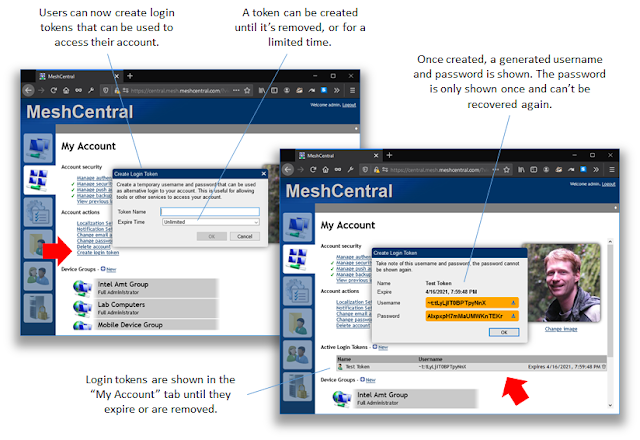
I have been running a behind on writing up blogs and now, there is a pile of changes and improvements to highlight. In the last weeks, MeshCentral gained many more fundamental features including login tokens, mobile support for remote terminal, messenger chat recordings and improved guest device sharing. In detail: MeshCentral support for login tokens . Users can now create temporary account login tokens that are used login to their account. There is a YouTube video on this here . This is useful in many ways. You can create a token to give to an automated script that will login and perform actions on remote devices. This is especially useful for MeshCentral servers that are connected to a single sign-on portal. Normally, these servers don’t allow tools like MeshCentral Router, MeshCMD and MeshCtrl to login, but you can now do it with login tokens. When connecting to MeshCentral using a login token, account settings, image, 2FA settings and password can’t be changed. So, the login token...

MeshCentral - Push Notification 2FA Support + 3 more YouTube videos.

Image
As with any remote management software, security is critical and multi-factor authentication is an essential part of solid security. However, security does not have to be inconvenient or expensive. Today, MeshCentral v0.8.12 was published along with MeshCentral Android Agent v1.0.10 that is pending approval on the Google Play store . Once you updated to both, you can now use your Android device as a MeshCentral authentication factor. Better yet, this feature often only available to enterprises and large organizations is free with MeshCentral. Also, this week three new videos where posted on the MeshCentral YouTube channel . In detail: MeshCentral push notification 2FA . Earlier this year, MeshCentral got a new agent for Android along with Firebase push notification support. Today, we put these features to use with an updated server and Android agent that support two-factor push notification requests. The push notification will go thru the public MeshCentral.com server and be forward...

MeshCentral - New YouTube channel, Intel AMT credentials, UI customizations, OpenSSL

Image
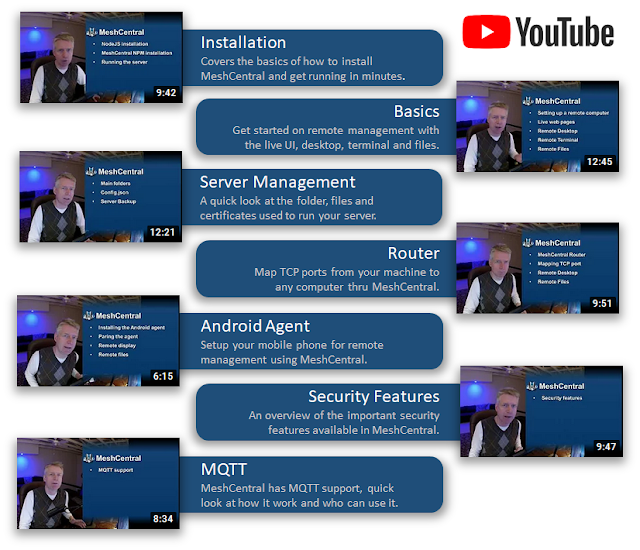
In the last few weeks, I got myself a small streaming studio with new camera, microphone, lights, and capture cards. All this so I could launch the new MeshCentral YouTube channel with new videos published every Wednesday! On top of that, MeshCentral has gotten a crazy new Intel AMT credential management feature and many more bug fixes and improvements. Very excited about this week. In detail: MeshCentral YouTube Channel . This is very exciting. There is now a new MeshCentral YouTube channel with 7 videos already online and one more being published every Wednesday. The videos are starting off with the basics but will get increasingly more detailed to cover more specific and less known about features of MeshCentral. In the last few weeks, I got myself a full video streaming setup along with HDMI video capture devices so I can capture the HDMI output of the Intel AMT computer and split screen with the management console. You will see this in upcoming videos. I welcome suggestions for u...

MeshCentral - Account Images, Improved Multi-Device Viewing, Improved Android Agent

Image
This week, we have some fun improvements to MeshCentral with the addition of account pictures. This allows accounts to be better customized and for administrators and chat sessions to see account images. This is a small part of making MeshCentral a great open source manageability solution. In addition to this, the multi-desktop viewer was improved, and a new version of the Android agent was published on Google Play . In detail: Account Images . The latest version of MeshCentral allows users to go in the “My Account” tab and set a square image for their account. You can change or remove the image at anytime and changes to the account image will be reflected on other open browsers in real time (except for Messenger). Setting an image is as easy as clicking on the previous image and selecting a JPEG or PNG file. On the mobile application, you can click on the image and most mobile devices will allow you to use the camera to take a picture. The server stores a 256x256 size image in the dat...