Posts

MeshCentral - Login Tokens, Mobile Terminal, Chat Recordings, Guest Sharing
Image
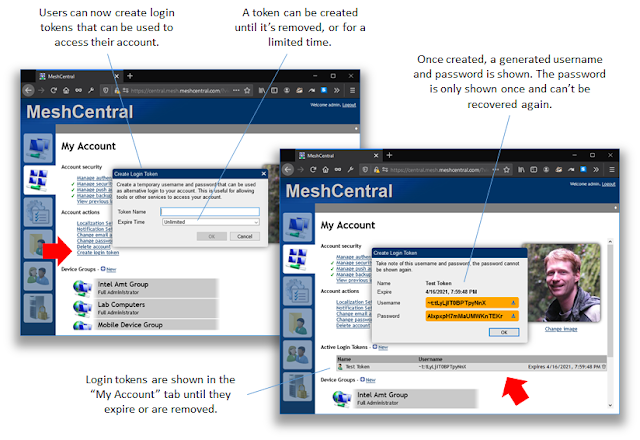
I have been running a behind on writing up blogs and now, there is a pile of changes and improvements to highlight. In the last weeks, MeshCentral gained many more fundamental features including login tokens, mobile support for remote terminal, messenger chat recordings and improved guest device sharing. In detail: MeshCentral support for login tokens . Users can now create temporary account login tokens that are used login to their account. There is a YouTube video on this here . This is useful in many ways. You can create a token to give to an automated script that will login and perform actions on remote devices. This is especially useful for MeshCentral servers that are connected to a single sign-on portal. Normally, these servers don’t allow tools like MeshCentral Router, MeshCMD and MeshCtrl to login, but you can now do it with login tokens. When connecting to MeshCentral using a login token, account settings, image, 2FA settings and password can’t be changed. So, the login token...

MeshCentral - Push Notification 2FA Support + 3 more YouTube videos.

Image
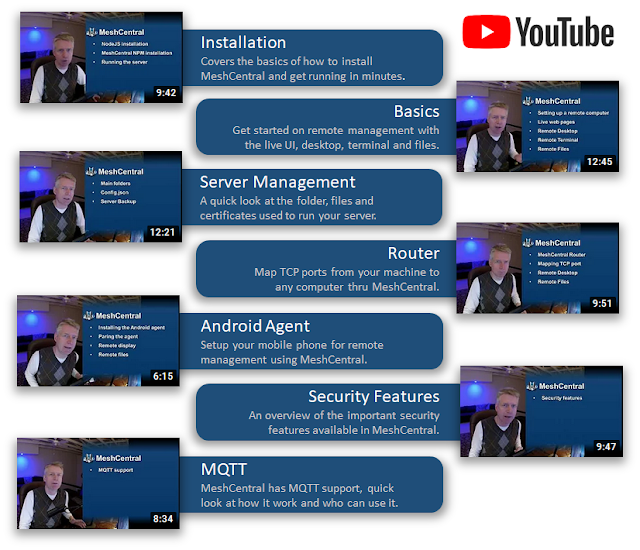
As with any remote management software, security is critical and multi-factor authentication is an essential part of solid security. However, security does not have to be inconvenient or expensive. Today, MeshCentral v0.8.12 was published along with MeshCentral Android Agent v1.0.10 that is pending approval on the Google Play store . Once you updated to both, you can now use your Android device as a MeshCentral authentication factor. Better yet, this feature often only available to enterprises and large organizations is free with MeshCentral. Also, this week three new videos where posted on the MeshCentral YouTube channel . In detail: MeshCentral push notification 2FA . Earlier this year, MeshCentral got a new agent for Android along with Firebase push notification support. Today, we put these features to use with an updated server and Android agent that support two-factor push notification requests. The push notification will go thru the public MeshCentral.com server and be forward...

MeshCentral - New YouTube channel, Intel AMT credentials, UI customizations, OpenSSL

Image
In the last few weeks, I got myself a small streaming studio with new camera, microphone, lights, and capture cards. All this so I could launch the new MeshCentral YouTube channel with new videos published every Wednesday! On top of that, MeshCentral has gotten a crazy new Intel AMT credential management feature and many more bug fixes and improvements. Very excited about this week. In detail: MeshCentral YouTube Channel . This is very exciting. There is now a new MeshCentral YouTube channel with 7 videos already online and one more being published every Wednesday. The videos are starting off with the basics but will get increasingly more detailed to cover more specific and less known about features of MeshCentral. In the last few weeks, I got myself a full video streaming setup along with HDMI video capture devices so I can capture the HDMI output of the Intel AMT computer and split screen with the management console. You will see this in upcoming videos. I welcome suggestions for u...

MeshCentral - Account Images, Improved Multi-Device Viewing, Improved Android Agent

Image
This week, we have some fun improvements to MeshCentral with the addition of account pictures. This allows accounts to be better customized and for administrators and chat sessions to see account images. This is a small part of making MeshCentral a great open source manageability solution. In addition to this, the multi-desktop viewer was improved, and a new version of the Android agent was published on Google Play . In detail: Account Images . The latest version of MeshCentral allows users to go in the “My Account” tab and set a square image for their account. You can change or remove the image at anytime and changes to the account image will be reflected on other open browsers in real time (except for Messenger). Setting an image is as easy as clicking on the previous image and selecting a JPEG or PNG file. On the mobile application, you can click on the image and most mobile devices will allow you to use the camera to take a picture. The server stores a 256x256 size image in the dat...

MeshCentral - Intel AMT security and activation improvements

Image
This week, the focus will be on Intel® AMT with Intel® Setup and Configuration Server (Intel® SCS) no longer being available for download after March 31st some have asked that MeshCentral fill the void with additional features. One unique feature of Intel SCS is its ability to perform bare-metal activation of Intel® AMT without operating system help. This week, MeshCentral just gained this feature making it possible to turn on Intel AMT without the need to run any agent or software in the OS. More importantly, MeshCentral continues its security leadership with the addition of host-based end-to-end TLS Intel® AMT ACM activation. MeshCentral is the first activation tool to offer this capability for Intel® AMT v14 and above to further improve your asset and network security. In detail: End-to-End TLS Host based ACM activation . With Intel AMT v14 and above there is a new and more secure Admin Control Mode (ACM) activation flow allowing MeshCentral to activate Intel AMT in ACM over the In...

MeshCentral - Android Screen Sharing, Previous Logins, Device Router Links, Router SSH, OS Filter

Image
One more stack of improvements and new features this week. The most difficult feature to implement and the most interesting is the addition of display sharing support in the MeshCentral Agent for Android. You can now see your mobile device’s screen on MeshCentral which is very cool. The new version of the Android Agent is now on the Google Play store . On top of this, there are plenty of improvements to the main web site and MeshCentral Router. In detail:   Android Screen Sharing . The big news this week is that the MeshCentral Android Agent now has support for screen sharing. It works just like other operating systems except that it’s view-only and device side user consent is required. The consent prompt is shown then then administrator clicks the connect button on the web site. Once approved, the device’s screen will show up on the MeshCentral web site as one would expect. The viewer supports screen rotation, so the display will adjust when the device is rotated. This new feature...

MeshCentral - Security Tracking, Dark Mode, Mobile App URL, Agent Update, Router Branding

Image
This week again we have another stack of MeshCentral improvements, much of it was driven by community requests and so, continuing along the path to making MeshCentral the best open source remote management software available. A lot of bug fixes are occurring under the covers and on GitHub, but this week we have a wide array on noticeable improvements, from security filtering to dark mode and improved branding. In detail: Windows Security Center overview and filter . The Microsoft Windows Security Center provides information on antivirus, firewall and automatic Windows updates. This information is already relayed in real-time on the MeshCentral web page. This week, we added this information to the device group summary page so that you can quickly see for each device group how many devices have issues like a disabled firewall or automatic update turned off. In addition, there are now new search filters so you can quickly focus in on devices with issues. Browser and OS dark mode automatic...