Posts

MeshCentral - Desktop Multiplexor

Image
This week, MeshCentral added an important new capability that has been requested by many users, the ability to multiplex a single remote desktop session to many browsers at once . In the past, if many different browsers would connect to see the same computer at the same time, the traffic was not efficient, and the slowest browser would drag everyone else down.  With the latest release of MeshCentral, there is a new option to enable a desktop multiplexor module that actively understands the remote desktop protocol and perform data caching and arbitration between the different viewers. Let’s look at the details: Desktop tile caching . Once enabled, MeshCentral will cache all graphics data that is currently visible for the desktop session. It keeps an ordered list of what data is visible from oldest to newer and can replay the entire desktop when a new viewer joins the session. As new images come in, the server looks at what previous images are not longer visible and updates the lis...
MeshCentral - Plivo and Twilio SMS support

Image
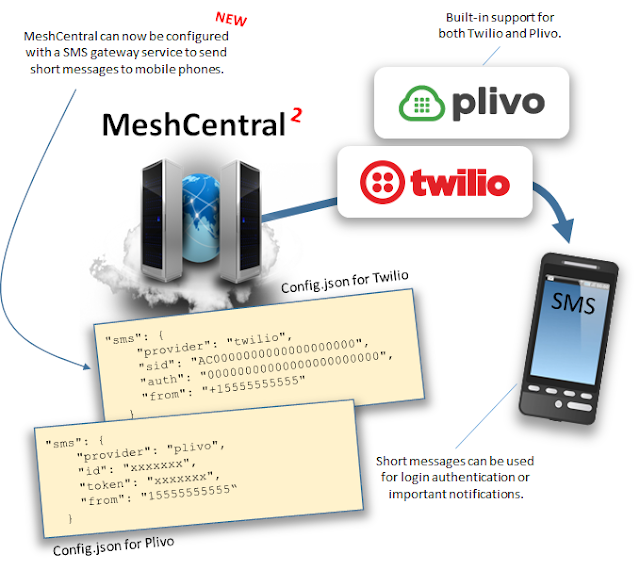
With the latest version of MeshCentral v0.5.13, there is now built-in integration for outbound SMS text messaging services Plivo and Twilio allowing MeshCentral to verify the phone number of a user and then use this number to send 2FA login messages and other notifications. This brings MeshCentral to an all new level. Plivo and Twilio are among other things, SMS gateway services that allow servers like MeshCentral to send SMS messages worldwide using REST API calls. You must first setup an account (Free trial accounts are available), you then configure your application identifier and key along with outgoing phone number (you need to get a phone number from the service you are using). Once setup, MeshCentral can send SMS messages. Let’s look at a few details: SMS Gateway Setup . It takes a few minutes to get a trial account with limited features from one of the supported service providers. Place your ID and Key in MeshCentral’s configuration and you are ready to go. Don’t forget tha...

MeshCentral - Stable version, Email validation, UI improvements

Image
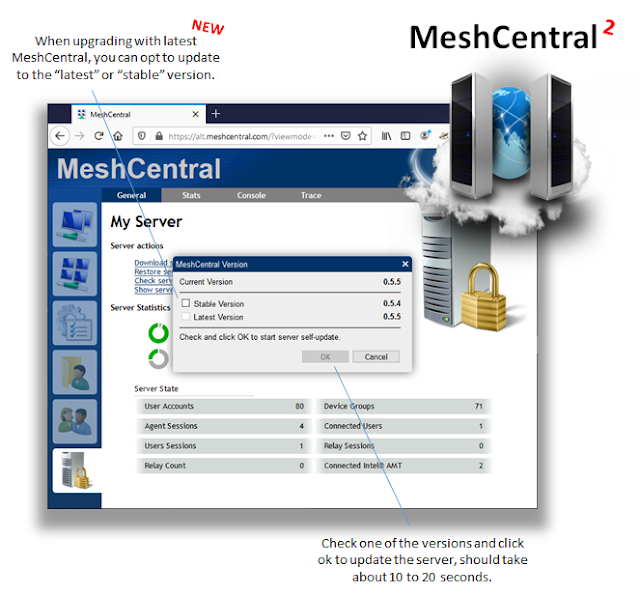
More work went on this week to improve MeshCentral’s usability mostly as a result of requests by the GitHub community. One noticeable change this week was the MeshCentral version numbers changed from 1.2.3-a format to just 1.2.3 making the version numbers much simpler and compatible with Semantic Versioning ( semver.org ). MeshCentral’s upgrade system now supports both “latest” and “stable” versions. This on top of many more user interface improvements, improved night mode and a new email verification login screen. Let’s look at all this in detail: Semantic versioning and new “stable” releases . The MeshCentral self-updating system was itself upgraded this week with the change in versioning and the addition of the “stable” tag in NPM. In the past, administrators could only update to the latest version of MeshCentral, but now, you can wait and only upgrade to the latest stable version. This new system allows the community to test a new version before it’s marked as stable. User inter...

MeshCentral - Improved Access Control, Batch Operations, User Consent, macOS

Image
This week again, MeshCentral has continued to rapidly evolve in many ways. Bryan Roe has published many new releases of the MeshAgent with improved security, network stability and macOS support. In addition, the MeshCentral server got a few big upgrades with the addition of batch operations on users and user groups, advanced user consent settings and improved and more flexible access control system. Let’s look at all this in detail: Assigning individual devices to user groups . Before this week, one could create a user group and assign device group rights to the user group. You could also, as per a previous blog, assign users to an individual device. Now, the access control system was improved again and MeshCentral allows you to assign individual device permissions to a user group. This makes assigning permissions very flexible as you can now have many user groups and assign permissions as needed, for a device or a device group. Because permissions are cumulative, there is plenty of ...

MeshCentral - Linux Remote Cursor, Multi-Language Emails & more

Image
Plenty more work has been done over the last two weeks continually improving MeshCentral. This week, the new features where a bit all over the place as Bryan Roe released a new MeshAgent for all platforms (Windows, Linux, MacOS and FreeBSD) and the server saw some more bug fixing and various new features requested by the community. Here are some of the notable improvements this week: Remote mouse cursor now visible on most Linux distributions . In the past few weeks, Bryan had built support for seeing the remote mouse cursor when it’s moved by the remote user on Windows only. Now, this support was extended to most Linux distributions. This feature is important when the remote user wants to show or point out something using the mouse. This feature was difficult to implement on Linux as there are many variations within different Linux distributions. Multi-language emails . MeshCentral can now send email messages in many different languages using a completely new email template system ...

MeshCentral - Individual Device Rights, HeapDump

Image
This week a major new update to MeshCentral was published with a single big feature that caused a lot code changes all over the project. Because of this, community testing and feedback is very much appreciated. The big feature is that you can now assign user permissions for individual devices instead of an entire device group. In the past, you created a device group and assigned user rights to that device group. This did not allow individual devices to be singled out. Users have been working about this limitation by creating many different device groups with different user permissions and moving devices between groups. This was far from ideal. Anytime you change the access control system, it’s a big deal as your changing a lot of code. In addition, with this new release a user can be given access to a single device but not the group that this device belongs to. So, the web application needs to deal with how to display this device. A new “Individual Devices” header will now show up w...

MeshCentral - Router, Internalization, Account Reset, HAProxy

Image
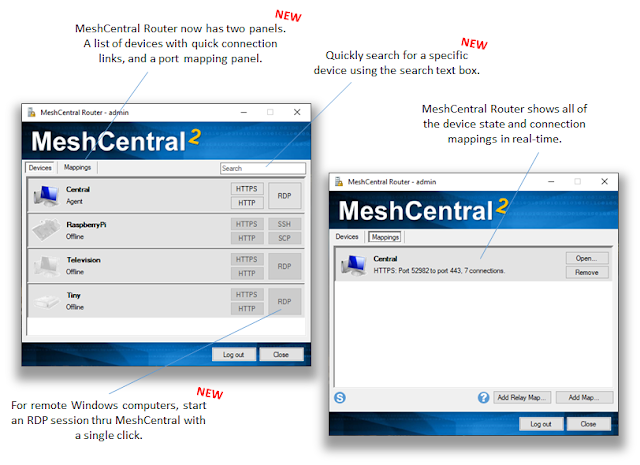
This week there is plenty more to talk about with many more releases, bug fixes and new features. Probably the two biggest topics of the week are the improved MeshCentral Router and improves internalization with more languages and translation tools. Improved MeshCentral Router . MeshCentral Router is a TCP/UDP port mapping tool that allows applications like RDP and SSH to be directed thru the MeshCentral server. This tool allows , for example, quick access to your remote Windows devices using RDP. This week MeshCentral Router got a lot of improvements including a new devices panel that shows all devices in real-time including connection status and allows you to start an RDP session with a single click. Also added was email two-factor authentication support and better support for non-standard ports. Added languages . This week, MeshCentral got added machine translations for Korean, Hindi and Simplified Chinese. While the quality of the translation is low, it’s a starting point for co...