Posts

MeshCentral - Individual Device Rights, HeapDump

Image
This week a major new update to MeshCentral was published with a single big feature that caused a lot code changes all over the project. Because of this, community testing and feedback is very much appreciated. The big feature is that you can now assign user permissions for individual devices instead of an entire device group. In the past, you created a device group and assigned user rights to that device group. This did not allow individual devices to be singled out. Users have been working about this limitation by creating many different device groups with different user permissions and moving devices between groups. This was far from ideal. Anytime you change the access control system, it’s a big deal as your changing a lot of code. In addition, with this new release a user can be given access to a single device but not the group that this device belongs to. So, the web application needs to deal with how to display this device. A new “Individual Devices” header will now show up w...
MeshCentral - Router, Internalization, Account Reset, HAProxy

Image
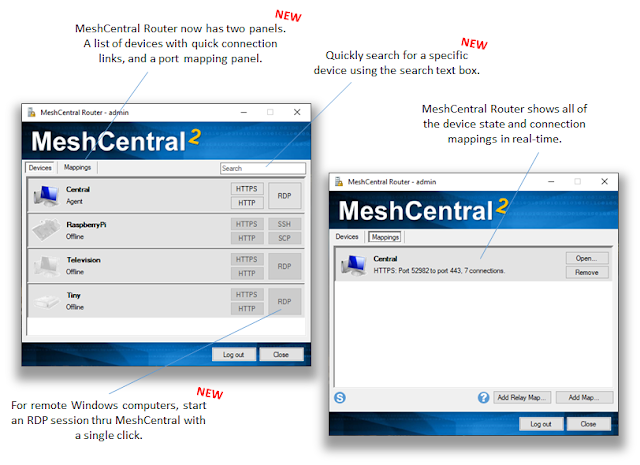
This week there is plenty more to talk about with many more releases, bug fixes and new features. Probably the two biggest topics of the week are the improved MeshCentral Router and improves internalization with more languages and translation tools. Improved MeshCentral Router . MeshCentral Router is a TCP/UDP port mapping tool that allows applications like RDP and SSH to be directed thru the MeshCentral server. This tool allows , for example, quick access to your remote Windows devices using RDP. This week MeshCentral Router got a lot of improvements including a new devices panel that shows all devices in real-time including connection status and allows you to start an RDP session with a single click. Also added was email two-factor authentication support and better support for non-standard ports. Added languages . This week, MeshCentral got added machine translations for Korean, Hindi and Simplified Chinese. While the quality of the translation is low, it’s a starting point for co...

MeshCentral - Let's Encrypt, Remote Mouse, Device Details, TouchID

Image
This week we got a stack bug fixes and improvements. This last month has been focused on a lot of bug fixing from the community, but we also added a few more feature. In details: Improved Let’s Encrypt support . Starting with v0.5.0, MeshCentral as transitioned from using GreenLock for Let’s Encrypt support to ACME-Client. As a result, if you are using Let’s Encrypt now and update to the latest MeshCentral, the server will come back to the un-signed certificate for a few minutes as it’s requesting a new TLS certificate using the new library. The new code allows NodeJS v8.0+ to support Let’s Encrypt (In the past NodeJS 10.12 was required) and there are new commands in the “My Server” / “Console” tab to check Let’s Encrypt status. The new code is also much smaller and should be much more robust than the old one. See picture below for the new commands (LE, LECHECK, LEEVENTS). Remote Mouse Cursor on Windows . When remotely controlling a computer, it’s sometimes possible for the remote u...

MeshCommander - Quick TLS, GitHub, Twitter

Image
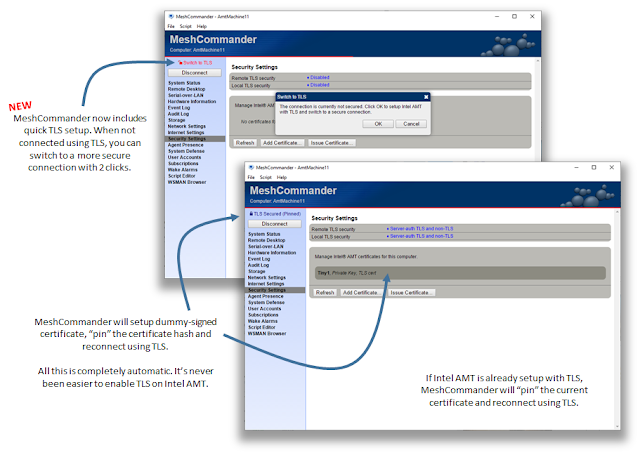
MeshCommander is an open source Intel® Active Management Technology (Intel® AMT) management console tool. Version 0.8.1 just got released with much to talk about. MeshCommander has had many minor releases since v0.8.0 to fix various issues, but in v0.8.1 there is a new “Quick TLS” feature that allows users to setup Intel AMT with TLS and switch to a more secure connection in only two mouse clicks. Even more significantly, MeshCommander is now on GitHub making it possible for the community to track changes and contribute with feedback, bug reports and pull requests. In detail: - Quick TLS . Using Intel AMT without a secure connection may be ok in some cases (some private network and VPN situations), however for most use cases, it’s not ideal. In the past, setting up Intel AMT with TLS required various tools, a certificate authority and enough knowledge of Intel AMT.  With MeshCommander v0.8.1, you can now setup TLS with just two clicks. When connecting to Intel AMT without TLS, ...

MeshCentral - Desktop Recording Indexing, French Translation, Auth.log and more

Image
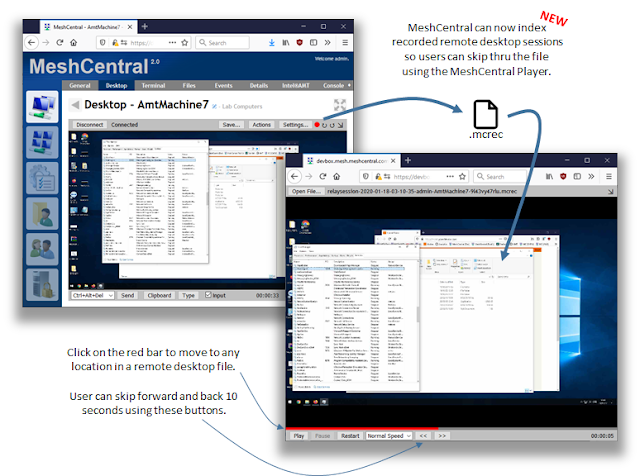
This week, many more improvements and features where added to MeshCentral, most notably a big improvement on an important feature: the remote desktop recording system. In order to conform to auditing policies, some administrators must be able to record remote desktop sessions that are carried out by technicians. Because of the protocol, it was not possible to skip to any location in the file until today. This and many other improvements this week in detail: Recorded Remote Desktop Indexing . Many months ago, MeshCentral was released with support for session recording. It works by recording the network traffic and adding timestamps and direction flags when writing the stream to a file. Because remote desktop only sends portions on the screen that change, it was not possible to skip forward into a remote desktop session using the MeshCentral Player. This week, we fixed this with a new indexing feature. MeshCentral can now create an index each 10 seconds of the location in the file and ...

MeshCentral - Docker Agent, XTerm, TLS 1.3, URL Tracking, Spanish

Image
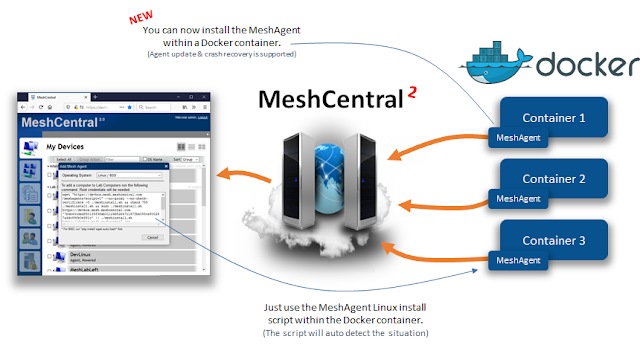
It’s been a while since the last blog post and MeshCentral continues to evolve with multiple new releases on most business days. In this post, we got a bunch more new features including some more crazy ones. Probably the most important is the ability for the MeshAgent to be installed within a Docker container. Using this new feature, you can now manage your Docker container just like any other device remotely using MeshCentral. The Linux install script will automatically detect it’s being installed within Docker and adjust accordingly. Many more new features in detail: MeshAgent within a Docker container . This is probably one of the more crazy features that has been published in a while. Normally on Linux, the MeshAgent will install itself so it can auto-start using Systemd or Initd, but these services don’t exist within a Docker container and so, the latest version of the Linux install script will auto-detect this situation and install the agent correctly within Docker. As a result...

MeshCentral - Support for User Groups

Image
MeshCentral is being used in increasingly larger and more complex environments and so, the user community has been asking for features that will enable larger deployments. One of the most important asks has been user groups support, that is, being able to group many users into a user group and assigning a user group a single set of permissions to devices. This way, you can have many technicians in a group and assign the permission only once to a set of devices. This makes permission management much simpler. In this new version of MeshCentral, user groups are now fully supported. In details: User Group Management . As an administrator, you can now go in “My Users”, “Groups” sub tab and create or remote users groups. You can also duplicate an existing group making it easy to create an new group using permissions from an existing group. Once created, you can click on a group and edit the name, description and members of a group. Improved Device Group Permissions . Once a user group has...