Posts

MeshCentral2 - OS support, Browser Tabs, Location & Security

Image
MeshCentral is an open source web based remote computer management web site. The last 2 weeks have been packed with an average of more than two releases a day. This rapid rate has been necessary in order to support the online feedback from everyone installing MeshCentral and giving it a try. This week, Bryan Roe really shined has he installed more different Linux distributions virtual machines than I have ever seen before. Bryan is testing the MeshAgent on as many Linux variants as he can get his hands on. The remote desktop feature is especially difficult to implement correctly on different Linux distros. Remote desktop is now working on Windows, MacOS, Ubuntu, PepperMint, Zoran, SUSE, Linaro, Fedora, CentOS and Raspbian . A very impressive task. More debugging is being done on all these operating systems, but it’s looking good so far, screenshots below. In addition this week: You can now Shift-Click on a device in MeshCentral to open it in a different tab. This has been an of...

MeshCentral2 - Two-step authentication support

Image
MeshCentral is being deployed at an ever increasing rate with more computers being managed it’s important that it be done as securely as possible. Last week, the MeshAgent got TPM support for hardening of device identity, this week it’s the user’s turn to have improved authentication with support for Google Authenticator and compatible applications. When logging into a web site, users are normally prompted for a username and password. This however can be a weak form of authentication. Especially for sites like MeshCentral that manage many computers, it’s important to authenticate users in the most secure way possible. One solution is RFC4226 and RFC6238 that standardize a way to transfer a pre-shared key to a user and compute a time limited token than is a second login factor. Google has a quick guide on 2 step authentication here which can be helpful. Starting with MeshCentral v0.2.6-j there is now full support for 2-step login. This is an optional process and to get it setu...

MeshCentral2 - Design Document, TPM support, Speed & IoT

Image
This holiday break was no break for MeshCentral as it continued to progress. Big thanks to the people that post issues on GitHub . Because of the community, MeshCentral is getting a lot better and issues that would be difficult to find are being fixed. Over the past month a lot of things have changed and here is a small rundown of some of them: Published the first version of the Design and Architecture document . This new document comes on top of the existing Install Guide and User’s Guide documents. It covers the internal workings of MeshCentral including the programming languages used, the dependencies, certificate generation, connection authentication, security and much more. The goal here for anyone to be able to get a good grasp as to how MeshCentral2 was designs, the trade-offs and how the security works. This is the first published version. Obviously, this document will grow in size as times permits. One possible use of this document is so that anyone can conduct a security ...

MeshCentral2 - Video Chat & Terminal

Image
MeshCentral is an open source web based remote computer management web site. As the software matures, people as increasingly been asking for features that enable remote support usages. For example, having the agent run only temporarily or being able to chat with a user on a remote computer. In the last few months, MeshCentral has gained some of these features including remote text chat. This week, we are doubling down and adding audio, video and file transfer support to the MeshCentral messenger application. Modern browsers have WebRTC for video conferencing and MeshCentral2 is now taking full advantage of this. First, when you establish a chat session, the browser will try to switch to using WebRTC to setup a direct path between the two browsers. If this is successful, all chat messages and file transfers are will go directly between the browsers, skipping the server. This reduces the server traffic, improves server scaling and lowers hosting costs. In addition, once the WebRTC dir...

MeshCentral2 - Running as an Appliance

Image
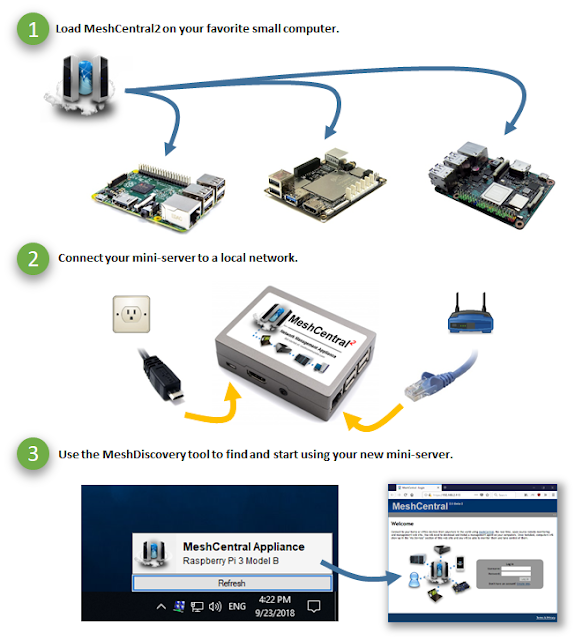
MeshCentral is an open source web based remote computer management web site. One of the interesting advantages of MeshCentral version 2 is that the server is written entirely in NodeJS and so, can run on many operating systems, including Linux. In addition, it can run very efficiently on tiny appliance devices with limited, CPU and RAM. For example, you can load it on a ASUS Tinker Board , a Latte Panda , a Raspberry Pi or any of such devices. Once installed, it can easily manage 100’s of devices on a local network including remote management thru Intel® AMT when available. You can often install very light operating systems on these appliances that don’t run X Windows, freeing a lot of storage space and RAM. The appliance form factor is perfect for an always on server that you can keep attached to a network router. Some of these boards can run using Power-over-Ethernet (PoE) so, only one cable needs to be plugged in. Once you have a device, get started using our MeshCentral Instal...

MeshCentral2 - Apple OSX, Ubuntu 18.04, Reverse-Proxy, MeshMessenger

Image
MeshCentral can manage a wide range of Windows and Linux computers. This week, we added initial support for Apple MacOS. Once you update to the latest MeshCentral, you will have the option to download and install the MeshAgent for Apple MacOS. In addition, we improved support for reverse proxies, added the first version of MeshMessenger, added Ubuntu 18.04 support and introduced a new built-in chat application. In details: Apple MacOS support. Supporting a new operating system is a lot of work. It’s especially difficult when the MeshAgent is trying to act as a remote desktop server and do this while users are logging in and out. Screen grabbing the user’s display and performing remote input is a lot of work. The code to do this changes a lot between operating systems. Doing all this on the latest MacOS is amazing. Due to security restrictions, we were not able to perform remote input on the MacOS login screen, but everything else should work correctly. This is an early version, ma...

MeshCommander 0.7.3 with CILA support

Image
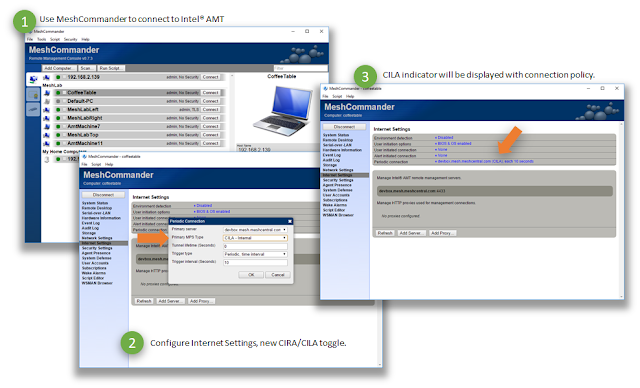
MeshCommander is an open source web-based Intel® AMT management console. It’s a leading edge tool and today, MeshCommander added support for Client Initiated Local Access (CILA) . It's important to be able to remotely manage computers both in software and hardware regardless of where they are connected. Client Initiated Remote Access (CIRA) has been around since Intel® AMT 4.x and provides the way hardware management can connect back to a cloud server. Starting with Intel® AMT 11.6, CIRA is joined by CILA, the local version of the same tunneling system. With CILA, you can now configure Intel® AMT to connect back to a home management server both over the Internet and over the local network . Using a tunneling protocol on the local network means that Intel® AMT is always accurately discovered by the management server. This makes it easy for a server like MeshCentral2 to keep track of all of the Intel® AMT capable devices on a local network. In addition, local management ports (...