Posts

MeshCommander 0.7.3 with CILA support
Image
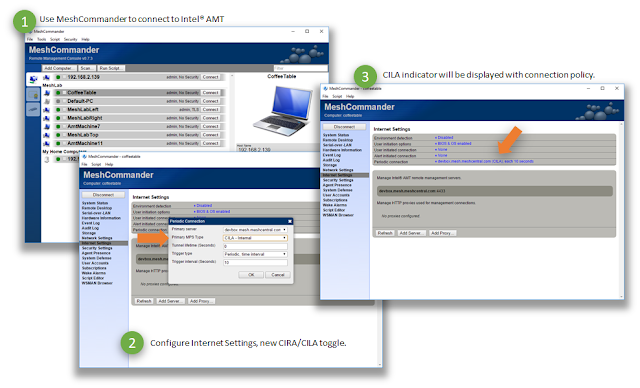
MeshCommander is an open source web-based Intel® AMT management console. It’s a leading edge tool and today, MeshCommander added support for Client Initiated Local Access (CILA) . It's important to be able to remotely manage computers both in software and hardware regardless of where they are connected. Client Initiated Remote Access (CIRA) has been around since Intel® AMT 4.x and provides the way hardware management can connect back to a cloud server. Starting with Intel® AMT 11.6, CIRA is joined by CILA, the local version of the same tunneling system. With CILA, you can now configure Intel® AMT to connect back to a home management server both over the Internet and over the local network . Using a tunneling protocol on the local network means that Intel® AMT is always accurately discovered by the management server. This makes it easy for a server like MeshCentral2 to keep track of all of the Intel® AMT capable devices on a local network. In addition, local management ports (...
MeshCentral now with reverse-proxy support

Image
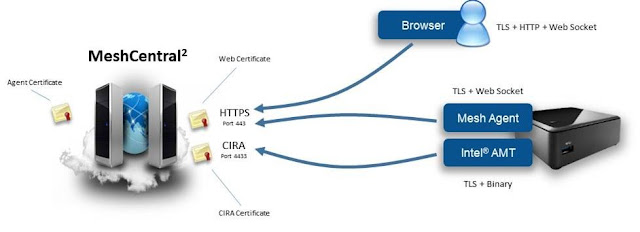
MeshCentral is an open source web based remote management server. This last week, MeshCentral was improved again with support for reverse-proxies that allow for improved scalability and flexibility when deploying MeshCentral as a web service. Any serious network administrator will know about reverse-proxies, notably NGINX but many others exists. There are many benefits including more flexibility in how a web server is configured, allows many web applications can run together on the same server, TLS offloading and load balancing. As more people deploy MeshCentral2, it’s became a more frequent request to add proper support for reverse proxies, notably NGINX. This week, a new version of MeshCentral was released on NPM along with a new MeshCentral User’s Guide 0.1.8 and a YouTube video with a tutorial on how to support NGINX . MeshCentral has an interesting design where the Mesh Agents connect to the server using web sockets on the same port that users connect on with browsers. This...

MeshCommander can connect to MeshCentral2

Image
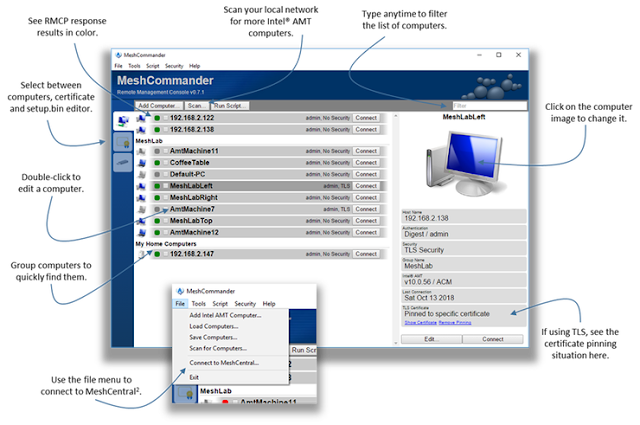
This week is a big one for the standalone version of MeshCommander as version 0.7.1 was released with an improved user interface and more significantly, the ability to connect to a MeshCentral2 account and manage computers over the Internet. Up until now, the standalone MeshCommander has been a break-fix Intel® AMT management console limited to your local network, but this limitation is removed with this new release as MeshCentral2 can act as a Management Presence Server (MPS) for MeshCommander. This new feature allows MeshCommander to perform WSMAN and KVM, SOL, IDER sessions over Intel® AMT remote connections (CIRA) greatly enhancing the capability of an already feature rich tool. There is a new YouTube demonstration video that shows off all the latest improvements. In detail: MeshCommander now has an improved user interface, especially the computer selection screen . The basic idea was to make MeshCommander look a lot like the new user interface of MeshCentral2 which...

MeshCentral Improved Windows Installer

Image
One of the amazing features of MeshCentral2 is that it can be installed quickly on pretty much any computer that is Windows or Linux. For Windows users, it’s super easy since the installer that does all the work. You can get a fully working server up and running in a few minutes. Any version of Windows 7 or better will work. This week, the MeshCentral2 installer for Windows was improved significantly . It’s not just an installer anymore, you can scan your local network to find MeshCentral2 servers, edit advanced settings, update the server and more. The new version 1.2 of the installer is available for download here . In details: The installer will only work when connected on the Internet as it will download and install the latest version of MeshCentral2. The new network scanner will find MeshCentral2 servers that are in “LAN mode” or “Hybrid mode” on the local network, this is going to be important for upcoming MeshCentral2 appliance support. The new advanced configuration scre...

MeshCentral improved user interface

Image
In the last two months MeshCentral got a lot better. Many new features, bug fixes and ease of use improvements so that a server can be installed and fully usable in a few minutes in many situations, and this on Windows and Linux. For many system administrators, all you need to know is “ npm install meshcentral ” to get started. Certainly the most noticeable change in the last few weeks is the new user interface marking a significant departure from the older MeshCentralv1. MeshCentralv2 run a fully real-time user interface so that you never have to hit a “refresh” button. The interface always displays the latest state of all devices and makes much better use of the complete surface area of the browser, making it great for both large screens and users who want to have a small browser window on the desktop. Check out the pictures below. Here are some more details on the latest update: New user interface will auto-scale to fill the browser window and has a new left side navigation ba...

Installer’s Guide, Windows7 and more.

Image
In the last few weeks we got the code a lot more stable and started working on testing installation of MeshCentral in many more environments. The current version is MeshCentral is v0.1.9-f . One of the interesting design decision was to build the entire server in NodeJS, this allows MeshCentral to quickly be installed and run on many different platforms including Windows and Linux. Last week, in addition to the existing MeshCentral User’s Guide , we published an all new MeshCentral Installer’s Guide that allows administrators to install MeshCentral on many different operating systems, on your own computers or major cloud providers . In other news, we added support for the MeshAgent on Windows7 which is probably one of the leading requests. Here is a look at everything in detail: Published MeshCentral Installer’s Guide . In this new guide , we walk thru how to install MeshCentral on Ubuntu Linux, the Raspberry Pi and on Amazon AWS, Microsoft Azure and Google Cloud. Many Linux admin...

MeshCentral New Mobile Web Application

Image
It’s been a while since the last announcement but I have been hard at work on MeshCentral , the web-based open source remote management software. This week we got a big new feature with release of MeshCentral v0.1.8-c on NPM , we now have a new web application for mobile devices . When you install your own MeshCentral server and access it using a mobile device (like a phone or tablet), you will see a new web page tailored for small devices. This is the first version of it, but already it offers many of the main usages that are offered on the main web site in a more compact form. Some of the features offered in the mobile application: New card stack UI . Unlike the main web site, the mobile site uses a card stack UI model, where you can select screens and hit “back” at any time to return. This is quite a different model from the tabs on the main site, but allows the UI to be significantly more compact. Real time user interface . Like the main web site, the mobile site is fully real t...