Posts

MeshCentral New Mobile Web Application

Image
It’s been a while since the last announcement but I have been hard at work on MeshCentral , the web-based open source remote management software. This week we got a big new feature with release of MeshCentral v0.1.8-c on NPM , we now have a new web application for mobile devices . When you install your own MeshCentral server and access it using a mobile device (like a phone or tablet), you will see a new web page tailored for small devices. This is the first version of it, but already it offers many of the main usages that are offered on the main web site in a more compact form. Some of the features offered in the mobile application: New card stack UI . Unlike the main web site, the mobile site uses a card stack UI model, where you can select screens and hit “back” at any time to return. This is quite a different model from the tabs on the main site, but allows the UI to be significantly more compact. Real time user interface . Like the main web site, the mobile site is fully real t...

Remote Toast, Agent Presence, Device Groups

Image
As people following the Mesh work would know, there are currently three open source tools for remote management of computers being worked on: MeshCentral , MeshCommander and MeshCmd . MeshCentral is a remote management web site, MeshCommander is a web based Intel® AMT management console and MeshCmd is a Linux & Windows command line tool that performs many Intel® AMT tasks. This week, I released new versions of all three tools. Let’s take a look at the improvements made to each of them: MeshCentral2 . We keep fixing bugs in the web site and improving performance, most changes will not be noticed by users except for the new toast button that is now available on the “Desktop” tab when remoting a Windows computer. The toast button allows the administrator to send a short text message that will be displayed on the remote computer. It’s a nice and quick way to make a message show up on remote computers. MeshCommander . In addition to many bug fixed and improved input validation on dia...

Notes, Account Management & Locking

Image
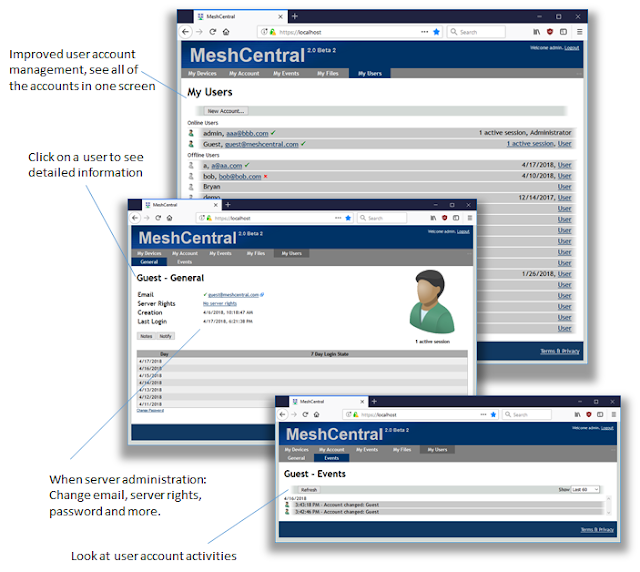
This week is the last feature release for a little while because of traveling and vacations coming up and a bit more focus on bug fixes. This said, we have a bunch of really good features released this week that improve MeshCentral2. The focus was on making administration of a MeshCentral2 server and users a lot better. New this week: Improved user management . For server administrators, the “My Users” tab is much better. Administrators will immediately see the difference. Users are now listed with online users on the top, improved indications of validated emails and for each user, there is now a full sub-section with user information and configuration and events for each user. You can how edit the email address, validation status, server rights and update the password in a single screen. The user management look and feel as also been improved. The user login timeline is not yet implemented, a placeholder is currently displayed. Account locking . Administrators can now lock out use...

Frame rate, Temporary agent, Processes

Image
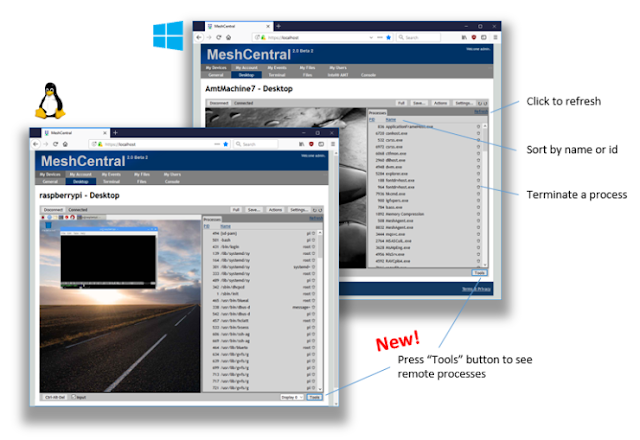
The pace of releases is accelerating as the core components of MeshCentral2 are maturing and it’s getting easier to build new features. The “all JavaScript” nature of MeshCentral2 with the browser, server, database and agent all being JavaScript makes things easy for developers. This week, we have 3 major new features to announce : New process control panel . When in the “Desktop” tab, you can now hit the “Tools” button to toggle the new tools view. In that panel, you will see the list of processes the remote computer is running both on Linux and Windows. In addition, you can sort the processes by ID or names and terminate a process remotely using the small garbage icon. One more way MeshCentral2 makes remote management of computers easy. Temporary Agent support . The MeshCentral server supports having the agent running in temporary mode. You can now download the agent executable and run it directly from the dialog box. The agent will keep running as long as the dialog box is open. ...

MeshCmd + User Notifications

Image
This week, Bryan Roe significantly improved the MeshCmd tool that is included in MeshCentral2 and available as a standalone download. Bryan added the capability to run MicroLMS and MeshCommander in the background and this on both Linux and Windows. Starting today, you can download MeshCmd and run: meshcmd microlms install/start/stop/uninstall meshcmd meshcommander install/start/stop/uninstall This will install and start in the background MicroLMS with LMS MeshCommander for local management, or MeshCommander for remote management. On Windows, it’s installed as a standard Windows Service. On Linux, the installation will work correctly on both newer systemd and older initd Linux computers, with the installation adapting correctly to each. In addition, MeshCentral2 got many bug fixes, security hardening and a few new features this week. Notably, you can now switch between the multi-desktop view and taking control of a computer’s desktop without the connection having to be re-establ...

Multi-computer desktop viewer

Image
This week is spring break in Oregon and we are going to celebrate with a smaller and more fun MeshCentral2 update. We just released support for viewing multiple computers desktop at the same time . This is very useful for digital signage usages where you want to monitor the screens of many computers in real time. In MeshCentral2 v0.1.5-p , you can now select “Desktops” in the view drop-down on the top right of the devices view. You will see all your currently connected computers and you can click on the screens to toggle connection to that device. On the multi-desktop screen, you click “Connect all” or “Disconnect all” to connect/disconnect all screens at once. Check “AutoConnect” to connect to all desktops and automatically connect to any new computer that comes online. Like all of the other screens on MeshCentral2, the multi-desktop screen is fully real time, with computer names, icons and status being updated on the web page without user interaction. If you are looking at managi...

MeshCmd, The new Intel AMT command line tool

Image
Just posted on the MeshCommander.com web site a new do-it-all command line tool for Intel® AMT that runs on both Windows and Linux . The new tool is called “MeshCmd” also called “MeshCommand”. It makes it easy to do all sorts of things with Intel AMT including: get Intel AMT state, perform basic activation, LMS services, configuration and remote management of other Intel AMT computers on the network and much more. If you are in the Intel AMT space, take a look at the new MeshCmd tutorial video on YouTube , it’s really worth a watch. MeshCmd is a single executable file available for download on MeshCommander.com along with a full user’s guide (pdf). Here is a quick list of what MeshCmd can do in the context of Intel AMT: Get the local state of Intel AMT, including version, activation state and more. Show the Intel AMT audit log of your local computer (even without any credentials) or of a remote computer. Startup LMS services along with local hosting of MeshCommander for L...